What can I do with ns2?
- Wired network simulations
- Wireless network simulations
- Includes common protocols (TCP, RealAudio, etc)
- Many low level details are configurable (queuing policy, MAC protocol, etc)
High Level Structure
- Library of C objects with TCL interfaces
- Nodes
- Routing Protocols
- Application Protocols
- etc.
- Connect the objects together via TCL
Workflow
- (Optional) Create custom ns2 object
- Create TCL scenario file
- Run the scenario to produce a trace file
- Process the trace file to get results
Basic Wireless Scenario
- Chain of 5 nodes, spaced 200m apart
- Use DSDV routing
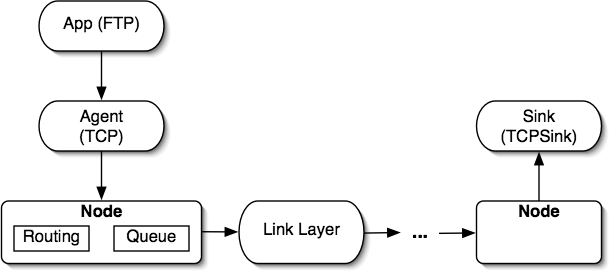
- FTP transfer from one end to the other
- Want to measure the throughput
Diagram

Options
# ===============
# Define options
# ===============
set val(chan)         Channel/WirelessChannel  ;# channel type
set val(prop)         Propagation/TwoRayGround ;# radio-propagation model
set val(ant)          Antenna/OmniAntenna      ;# Antenna type
set val(ll)           LL                       ;# Link layer type
set val(ifq)          Queue/DropTail/PriQueue  ;# Interface queue type
set val(ifqlen)       50                       ;# max packet in ifq
set val(netif)        Phy/WirelessPhy          ;# network interface type
set val(mac)          Mac/802_11               ;# MAC type
set val(rp)           DSDV                     ;# ad-hoc routing protocol
set val(nn)           5                        ;# number of mobilenodes
Set Up Simulator
# Create simulator
set ns_    [new Simulator]

# Set up trace file
$ns_ use-newtrace
set tracefd [open simple.tr w]
$ns_ trace-all $tracefd

# Create the "general operations director"
# Used internally by MAC layer: must create!
create-god $val(nn)

# Create and configure topography (used for mobile scenarios)
set topo [new Topography]
# 1000x1000m terrain
$topo load_flatgrid 1000 1000
Configure Nodes
$ns_ node-config -adhocRouting $val(rp) \
        -llType $val(ll) \
        -macType $val(mac) \
        -ifqType $val(ifq) \
        -ifqLen $val(ifqlen) \
        -antType $val(ant) \
        -propType $val(prop) \
        -phyType $val(netif) \
        -channel [new $val(chan)] \
        -topoInstance $topo \
        -agentTrace ON \
        -routerTrace ON \
        -macTrace OFF \
        -movementTrace OFF
Create Nodes
for {set i 0} {$i < $val(nn) } {incr i} {
        set node_($i) [$ns_ node]
        $node_($i) random-motion 0  ;# disable random motion
        $node_($i) set X_ 0.0
        $node_($i) set Y_ 0.0
        $node_($i) set Z_ 0.0
}

$node_(0) set X_ 0.0
$node_(1) set X_ 200.0
$node_(2) set X_ 400.0
$node_(3) set X_ 600.0
$node_(4) set X_ 800.0
Source and Destination
# 1500 - 20 byte IP header - 40 byte TCP header = 1440 bytes
Agent/TCP set packetSize_ 1440 ;# This size EXCLUDES the TCP header

set agent [new Agent/TCP]
set app [new Application/FTP]
set sink [new Agent/TCPSink]

$app attach-agent $agent

$ns_ attach-agent $node_(0) $agent
$ns_ attach-agent $node_(4) $sink
$ns_ connect $agent $sink
Node Structure
Run It
# 120 seconds of running the simulation time
$ns_ at 0.0 "$app start"
$ns_ at 120.0 "$ns_ halt"
$ns_ run

$ns_ flush-trace
close $tracefd
Trace File
s -t 0.000000000 -Hs 0 -Hd -2 -Ni 0 -Nx 0.00 -Ny 0.00 -Nz 0.00 -Ne -1.000000 -Nl AGT ...
r -t 0.000000000 -Hs 0 -Hd -2 -Ni 0 -Nx 0.00 -Ny 0.00 -Nz 0.00 -Ne -1.000000 -Nl RTR ...
- Each line represents a message being transferred
- Common fields:
- Event type (s = send, r = received, d = drop)
- Time stamp
- Source and destination
- XYZ co-ordinates of the node
- Network layer (AGT = agent, RTR = router, ...)
- ... many many others
Miscellaneous Tools
- Both command line tools and a Python API [details]
- ns2stats.py: Aggregate statistics
- throughputOverTime.py: Throughput per second
- stupidplot.py: Plot data from Python
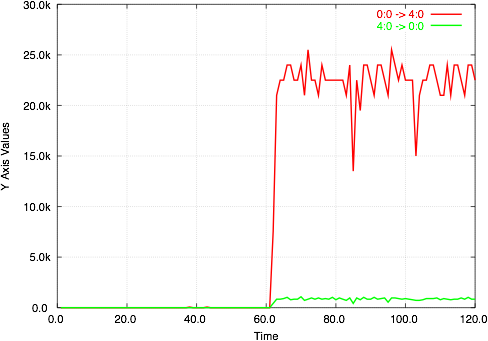
Throughput Over Time Output
Time    0:0 -> 4:0      4:0 -> 0:0
1.0     0.0     0.0
2.0     0.0     0.0
3.0     0.0     0.0
4.0     0.0     0.0
5.0     0.0     0.0
6.0     0.0     0.0
7.0     0.0     0.0
8.0     0.0     0.0
9.0     0.0     0.0
10.0    0.0     0.0
Stick it in GnuPlot
if len( sys.argv ) != 3:
        print "example.py trace-file output-eps-file"
        sys.exit( 1 )

input = file( sys.argv[1] )
flows = flowanalysis.parseFlowsFromTrace( input )
input.close()

data = throughputOverTime.throughputOverTime( flows )

stupidplot.gnuplotTable( data, sys.argv[2] )
Results
Random Tips and Tricks
- Automate everything
- Use command line parameters to customize scenario
- Read the trace files to understand what is happening
- GnuPlot sucks, but its the best thing available
Resources
http://evanjones.ca/ns2.html
# File: simple.tcl
# ======================================================================
# Define options
# ======================================================================
set val(chan)         Channel/WirelessChannel   ;# channel type
set val(prop)         Propagation/TwoRayGround  ;# radio-propagation model
set val(ant)          Antenna/OmniAntenna       ;# Antenna type
set val(ll)           LL                        ;# Link layer type
set val(ifq)          CMUPriQueue               ;# Interface queue type
set val(ifqlen)       50                        ;# max packet in ifq
set val(netif)        Phy/WirelessPhy           ;# network interface type
set val(mac)          Mac/802_11                ;# MAC type
set val(rp)           DSR                       ;# ad-hoc routing protocol
set val(nn)           5                         ;# number of mobilenodes


# Create simulator
set ns_    [new Simulator]

# Set up trace file
$ns_ use-newtrace
set tracefd [open simple.tr w]
$ns_ trace-all $tracefd

# Create the "general operations director"
# Used internally by MAC layer: must create!
create-god $val(nn)


# Create and configure topography (used for mobile scenarios)
set topo [new Topography]
# 1000x1000m terrain
$topo load_flatgrid 1000 1000

$ns_ node-config -adhocRouting $val(rp) \
 -llType $val(ll) \
 -macType $val(mac) \
 -ifqType $val(ifq) \
 -ifqLen $val(ifqlen) \
 -antType $val(ant) \
 -propType $val(prop) \
 -phyType $val(netif) \
 -channel [new $val(chan)] \
 -topoInstance $topo \
 -agentTrace ON \
 -routerTrace ON \
 -macTrace OFF \
 -movementTrace OFF

for {set i 0} {$i < $val(nn) } {incr i} {
 set node_($i) [$ns_ node]
 $node_($i) random-motion 0  ;# disable random motion
 $node_($i) set Y_ 0.0
 $node_($i) set Z_ 0.0
}

$node_(0) set X_ 0.0
$node_(1) set X_ 200.0
$node_(2) set X_ 400.0
$node_(3) set X_ 600.0
$node_(4) set X_ 800.0


# 1500 - 20 byte IP header - 40 byte TCP header = 1440 bytes
Agent/TCP set packetSize_ 1440 ;# This size EXCLUDES the TCP header

set agent [new Agent/TCP]
set app [new Application/FTP]
set sink [new Agent/TCPSink]

$app attach-agent $agent

$ns_ attach-agent $node_(0) $agent
$ns_ attach-agent $node_(4) $sink
$ns_ connect $agent $sink

# 120 seconds of running the simulation time
$ns_ at 0.0 "$app start"
$ns_ at 120.0 "$ns_ halt"
$ns_ run

$ns_ flush-trace
close $tracefd
Installation Notes
Error:
checking for tclsh8.4... /usr/bin/tclsh8.4
configure: error: Installation of tcl seems incomplete or can't be found automatically.
Please correct the problem by telling configure where tcl is
using the argument --with-tcl=/path/to/package
(perhaps after installing it),
or the package is not required, disable it with --with-tcl=no.
Solved: install 'tcl' package
make clean
make depend
g++  -Wall -Wno-write-strings -DCPP_NAMESPACE=std -o ucb-tr-stat tr-stat.o logparse.o utils.o -L/home/acgrid/ns2/lib -ltcl8.5  -lnsl -lpcap -ldl -lm
make[1]: Leaving directory `/home/acgrid/ns2/ns-2.35.test/indep-utils/webtrace-conv/ucb'

No comments:
Post a Comment